


Omantel Power BI Reporting Case Study: Together on One Screen

We built one Power BI reporting suite for the service teams who keep Oman connected.

Omantel Power BI overview dashboard on a laptop in front of the Muscat skyline
Client
Omantel
Industry
Telecommunications
Platform
Microsoft Power BI
Services
Dashboard UX, UI design, Power BI development

Every day, homes, businesses and government across Oman rely on Omantel to stay connected. When something breaks, service teams must spot it, own it and fix it before customers call twice. We designed and built the Power BI reports they use.

THE CHALLENGE

How We Helped Omantel’s Service Teams Answer Four Questions

  1. Morning

    “What Came in Overnight?”

    The first check of the day: how many incidents opened overnight, and which ones are urgent.

  2. Midday

    “Are We Still on Target?”

    Team leads compare response and resolution times against their service agreements.

  3. Afternoon

    “Who Has Too Much on Their Plate?”

    Work is moved between teams so no one falls behind. The workload report shows where the pressure sits.

  4. Month End

    “How Did We Do, and Why?”

    Directors look back at the month’s trends and customer feedback, and need to know why the numbers moved.

BEFORE

Five Spreadsheets Behind Every Answer

incidents_export.xlsx

sla_tracker_v3.xlsx

csat_survey.csv

workload_by_team.xlsx

monthly_report_FINAL.pptx

One Reporting Hub

Every figure in one place

So we brought every figure into one Power BI hub.

AFTER

One Power BI Suite, One Set of Filters

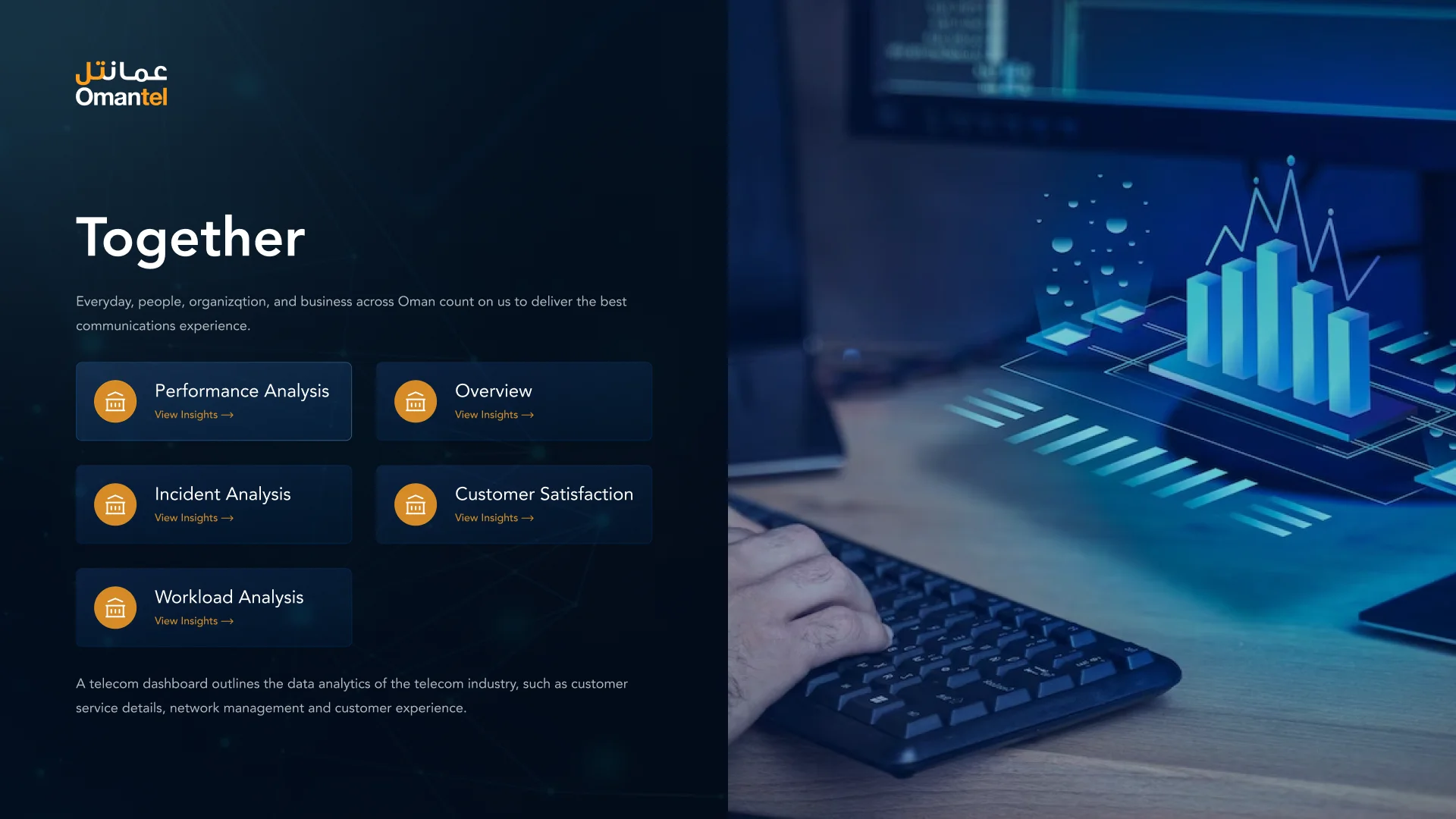
Omantel reports hub titled Together, with links to the overview, performance, incident, workload and customer satisfaction reports Omantel overview dashboard with six headline numbers, incidents by customer type and urgency, and the monthly incident trend
  • Same filters on every report
  • Six headline numbers vs last year
  • Trend explained in words
  1. Every report starts from a question on the reports hub.
  2. Pick a question, and the answer opens.
  3. The overview shows the whole month at a glance.

INSIDE THE REPORT

An Overview Built to Read in Seconds

Four design decisions make the overview quick to scan on a busy morning: headline numbers first, then who is affected, how urgent it is and what the trend says.

Keep scrolling

Incident volume
220
▲ 2% vs last year
Closure rate
18%
▼ 2% vs last year
SLA compliance
74%
▲ 2% vs last year
Avg. response time
13
hours

Headline Numbers First

Volume, closure rate, SLA compliance, response and resolution time open the page, each compared with last year. Leads see where the month stands straight away.

Enterprise
113
Consumer
107

Who Is Affected

Incidents are split by enterprise and consumer customers, then by VIP status. Teams see at once which customers a problem touches.

  • Critical
  • High
  • Medium
  • Low
  • Informational

How Urgent It Is

Five urgency levels, from critical to informational, each with its own colour. The same colour means the same urgency on every report.

October had the most incidents this year, more than double February.

The Trend, in Words

Short sentences next to the monthly trend call out the busiest and quietest months. Directors get the story behind the chart without working it out.

THE RESULTS

  • One Place for Every Figure

    Incidents, service levels, customer satisfaction and workload now live in a single Power BI suite, not five separate files.

  • Meetings Start on the Same Page

    Everyone reads the same numbers through the same filters, so reviews move straight to decisions.

  • Problems Spotted Earlier

    Leads can see slipping targets during the day, well before month end, while there is still time to act.

  • Ready for What Comes Next

    New reports can be added in the same layout and style, so the suite grows without starting again.

Tools & Technologies

The Tools Behind Omantel

  • Power BI
  • SQL Server
  • Microsoft Azure
  • Figma
  • Miro
  • Claude
  • OpenAI
  • Gemini
  • Jira
  • Trello
  • Asana
  • Power BI
  • SQL Server
  • Microsoft Azure
  • Figma
  • Miro
  • Claude
  • OpenAI
  • Gemini
  • Jira
  • Trello
  • Asana

Client Testimonials

Why 91% of Our Clients Stay With Us

Client Success

From idea to a product people love

We design and build digital products that are user-friendly, scalable and drive real business results.

User Engagement
+42%
Task Completion
2.4×
From Concept to Launch
6 Weeks

"They helped us produce several concepts — product design, user scenarios and much more. Deliveries were fast and high quality, letting us make a strong impression on our clients."

Nutroponics logoShreya LadCEO, Nutroponics

"They capture the vision and run with it — exceptional design and clean files for my developers. Couldn't be happier."

Imprint City logoBrandon PugmirePresident, Imprint City

"Consistently exceptional work with real dedication. We shipped an amazing app design together and I can't wait to collaborate again."

Hani Farajuseamelio.com

"Really pleased with the website they designed for our new brand. Fast delivery, took on every change, and a very professional finished product."

Freshminds logoAnayaHead of Marketing, Freshminds
Client results: Brands For Less, one sign-up flow in 10 countries; EDGE, one brand system for 35+ entities; Omantel, five reports in one Power BI suite Client Results

Rated across every major review platform

Upwork Top Rated Plus Trustpilot reviews Clutch reviews G2 reviews GoodFirms reviews

Have a Project in Mind? Let’s Talk.

Book a free consultation with our design, engineering and AI experts. Share your idea and we’ll come back within one business day with clear next steps.

Recognised By

  • Awwwards
  • Kokuyo
  • FWA

Our Offices

  • Dubai skyline

    Dubai

    UAE · Headquarters

    Office OFF2-127, SMARK 2 Building, Plot No. 33-0, Ras Al Khor Industrial Second, Dubai, UAE

  • Open Hand Monument, Chandigarh

    Mohali

    India

    B-409, Bestech Business Tower, Sector 66, SAS Nagar, Punjab 160062

  • Sydney Opera House and Harbour Bridge

    Adelaide

    Australia

    Tapleys Hill Road, Fulham Gardens, SA 5024

Speak With Our Experts

Tell us about your project and we’ll reply within one business day.

We only use your details to reply to your enquiry.